Networking Lab 01
CompletedEnterprise VLAN & Inter-VLAN Routing
A hands-on Cisco Packet Tracer lab focused on designing and configuring a segmented network using VLSM, VLANs, inter-VLAN routing, EtherChannel and Layer 2 security features.
Network Topology
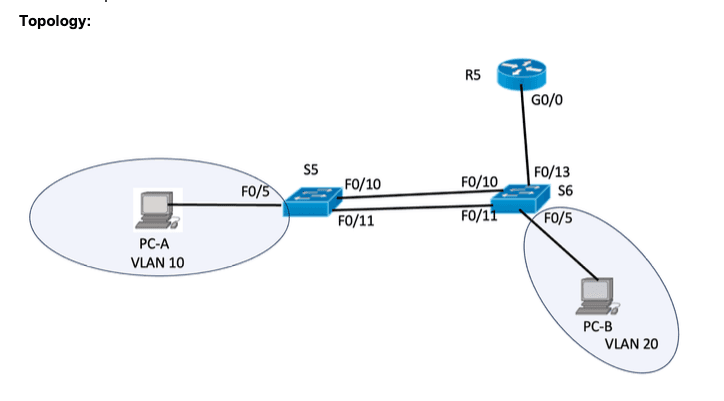
Lab topology: Router R5, switches S5 and S6, and two end-user devices across separate VLANs.
Project Overview
This lab simulates a small enterprise network requiring logical segmentation, efficient IP address allocation, inter-VLAN communication and secure switch configuration. Cisco Packet Tracer was used to build and configure the network using Cisco IOS commands.
IP Addressing & VLAN Design
| VLAN | Purpose | Subnet | Host Requirement |
|---|---|---|---|
| 10 | User1 | 172.16.64.0/21 | 1,025 |
| 20 | User2 | 172.16.72.0/23 | 505 |
| 30 | Management | 172.16.74.0/25 | 120 |
| 999 | Native VLAN | Not assigned | — |
Technical Implementation
VLAN Segmentation
Configured separate VLANs for user devices and management traffic, with a dedicated native VLAN.
Inter-VLAN Routing
Used router subinterfaces and 802.1Q tagging to enable communication between VLANs.
EtherChannel
Configured PAgP EtherChannel between switches to combine physical links into a logical connection.
Switch Security
Applied SSH management, port security, PortFast and BPDU Guard as part of the lab configuration.
Verification & Testing
Network verification includes checking VLAN assignments, trunk interfaces, EtherChannel status, routing interfaces, and connectivity between end-user devices. Configuration outputs and connectivity test screenshots can be added here to document the results.